Offlingo app icon Offlingo Offline AI Translator
AIRPLANE MODE · 100% ON-DEVICE AI

Translate anywhere.
No internet required.

Offlingo is a private, offline AI translator for Android and iPhone. Real-time two-way conversations, typed text, voice input, and camera OCR all run directly on your device — so it works on a plane, underground, or abroad with no signal.

Powered by Gemini Nano & Apple Intelligence

Your words, voice, and photos never leave your phone. No cloud AI servers, no sign-up, and no monthly subscription fees.

Free to use No account Works in airplane mode One-time ad removal

9:41 ✈ OFFLINE
Offlingo ON-DEVICE AI
English Japanese
ENGLISH
JAPANESE · ON-DEVICE
TAP A DETECTED TEXT BLOCK
ON-DEVICE OCR · NO UPLOAD
本日のおすすめ:特製味噌ラーメン ¥1,100
Today's special: House Miso Ramen ¥1,100

▲ Interactive preview: switch modes, tap phrases, or play audio

01 · Four modes, one offline app

Every way you need to translate on the move.

Whether you are ordering dinner, asking for directions, or reading a street sign, Offlingo keeps all four translation modes fast and ready without a signal.

01 · CONVERSATION

Face-to-face two-way translation

Share one phone between two people. Offlingo listens for both languages, detects who is speaking automatically, translates on the spot, and reads the result aloud.
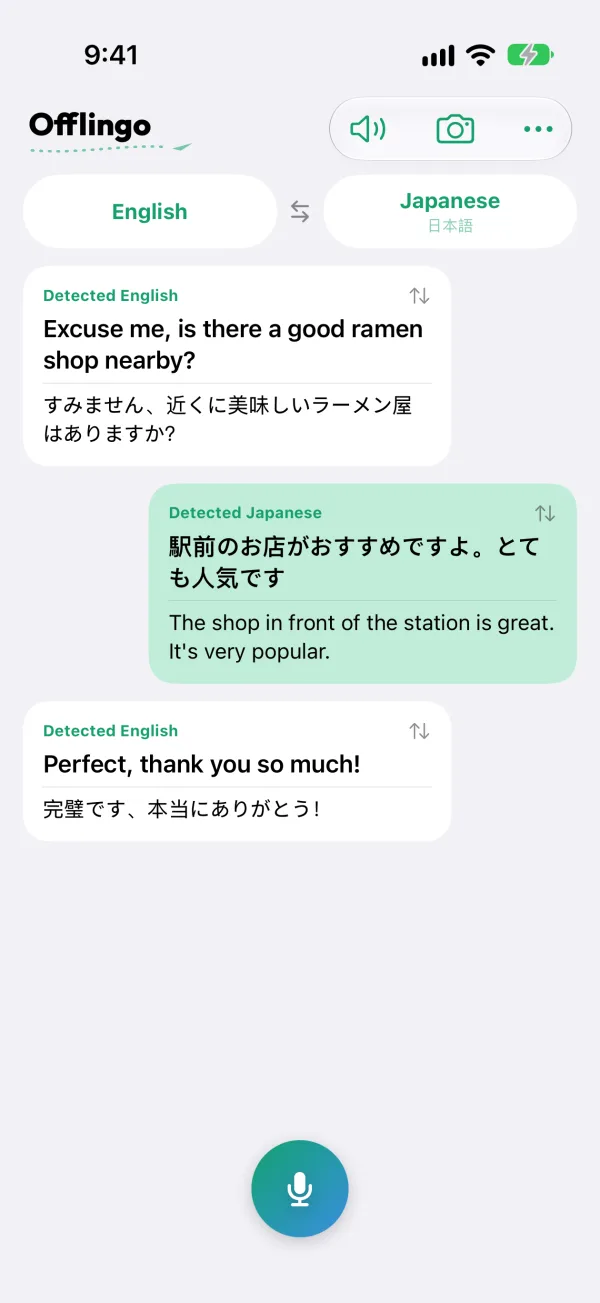
  • Auto language detection
  • On-device read-aloud
  • One-tap flip on misdetection
Offlingo Conversation mode showing two-way English and Japanese bubbles
02 · TEXT & VOICE

Type, speak, or share from any app

Translate as you type or dictate with on-device speech recognition. Copy, listen, star as a favorite, or translate text directly from other apps via the share sheet.
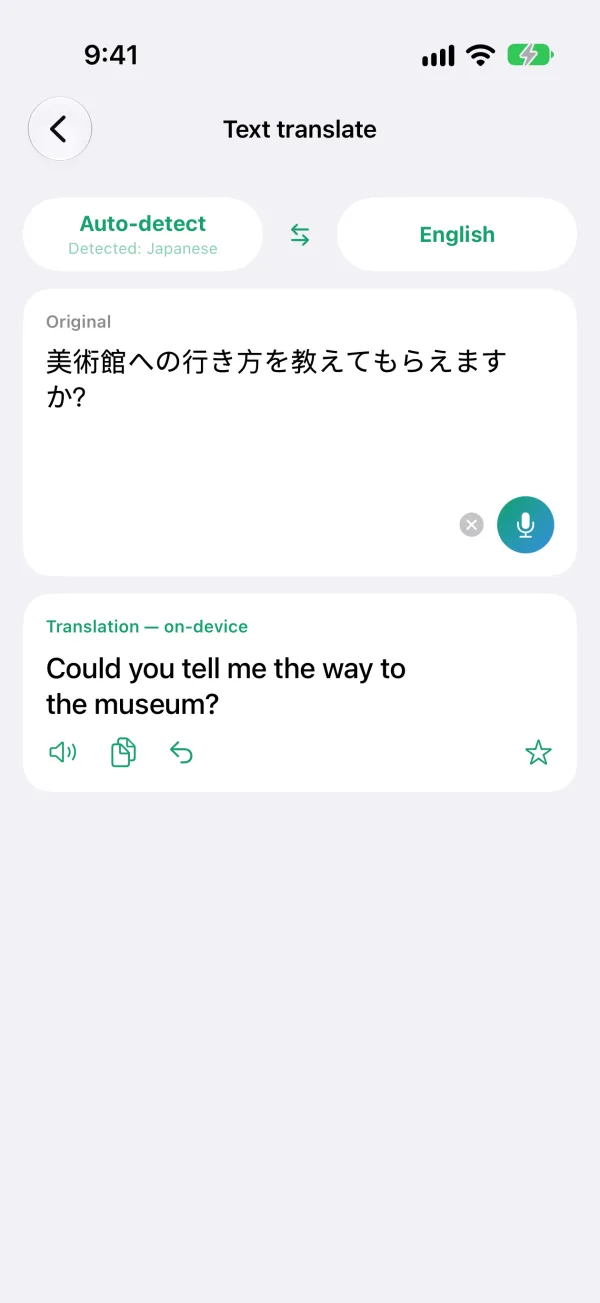
  • Instant streaming output
  • Offline voice input
  • Share from any app
Offlingo Text translation screen translating English to Japanese offline
03 · CAMERA OCR

Point at signs and menus

Snap a photo or pick one from your library. On-device text recognition extracts each text block cleanly — just tap the line you want to translate.
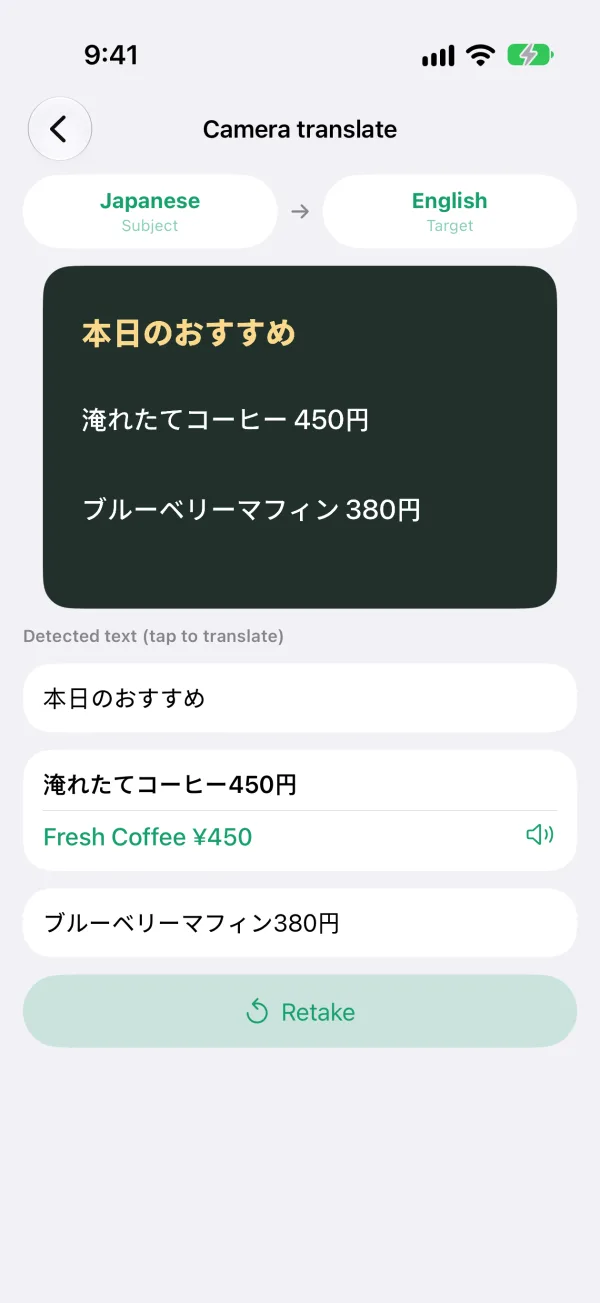
  • Menus & street signs
  • Block-by-block selection
  • Photos never leave device
Offlingo Camera OCR translation reading a menu and translating detected text blocks
04 · HISTORY & FAVORITES

Your private offline phrasebook

Every translation is saved locally on your phone. Star key phrases for instant recall at hotels, stations, and restaurants, and search or filter by language pair.
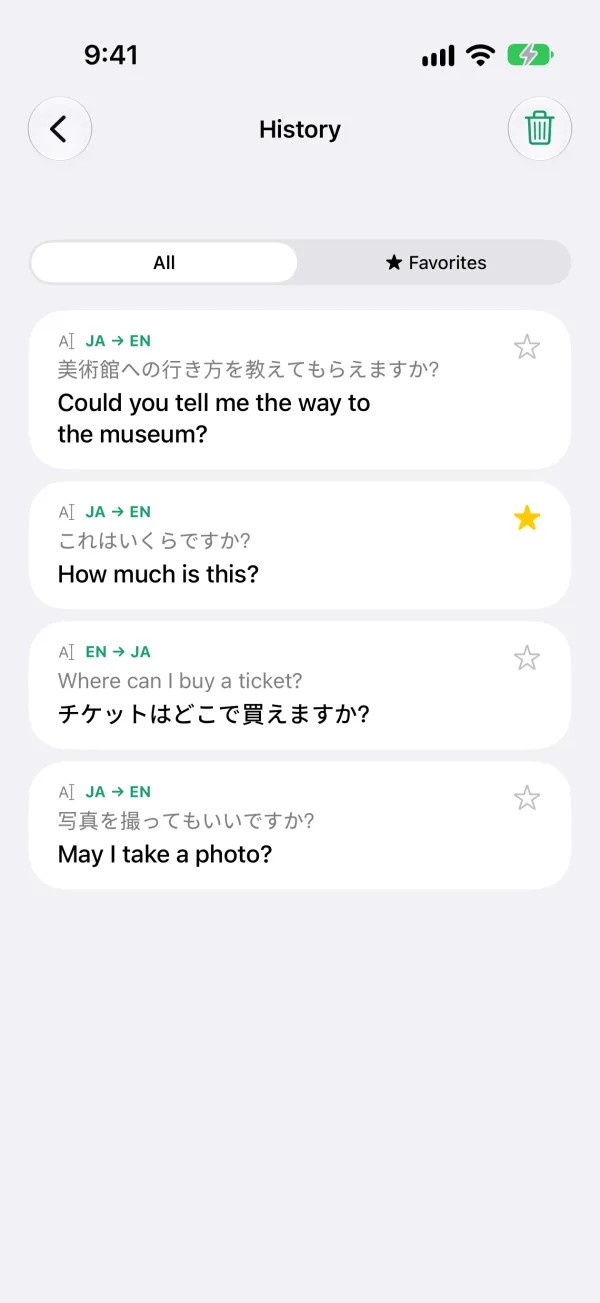
  • Local-only storage
  • Search & language filter
  • Delete anytime
Offlingo History and Favorites screen showing saved offline translations
02 · Privacy by design

Your words stay strictly on your device.

Cloud translators upload every sentence, voice recording, and photo to remote servers. Offlingo runs the entire pipeline locally on your phone's built-in AI hardware.

On your phone

100% Local Processing

On-device LLM Speech Recognition Text-to-Speech Camera OCR Local History DB
ZERO UPLOAD
External translation servers

Never Used

No text uploaded No voice recordings sent No photos uploaded

Works in airplane mode

Zero roaming fees, zero loading spinners. Translate smoothly even with Wi-Fi and mobile data turned off.

Confidential by default

Ideal for business travel, medical visits, and private conversations you do not want logged on cloud servers.

No account needed

No sign-up, no login, no cloud sync. Open Offlingo and start translating right away.

No subscriptions

All four modes are free with a bottom banner ad. One-time in-app purchase removes ads permanently.

03 · Built for real-world moments

Ready whenever signal drops.

Abroad & on flights

Fill out arrival cards on the plane, talk to taxi drivers right after landing, or explore rural towns without an eSIM.

Subways & basements

Read ticket machines, transfer signs, and basement restaurant menus where cellular reception never reaches.

Private business talks

Translate internal memos, contracts, or client meetings without exposing sensitive information to third-party APIs.

Language learning

Practice pronunciation with offline read-aloud and build your own searchable phrasebook of starred expressions.

04 · Languages & compatible devices

Powered by your phone's built-in AI.

Offlingo uses the pre-installed on-device AI model provided by your OS, keeping the app lightweight with zero bundled multi-gigabyte downloads.

Android

Gemini Nano · AICore
Compatible devices
Android devices with AICore / Gemini Nano support — including Pixel 9 series or later, Galaxy S24 / S25 series, and other supported models.
Supported languages (13)
EnglishJapaneseChineseKorean FrenchGermanSpanishItalian PortugueseRussianThaiVietnamese Indonesian
Other apps integration
Translate selected text from any app via the text selection menu ("Translate with Offlingo") or Android Share sheet.

iPhone

Apple Intelligence
Compatible devices
Apple Intelligence-capable iPhones (iPhone 15 Pro, iPhone 16 or later) with Apple Intelligence enabled in Settings.
Supported languages (16)
EnglishJapaneseChinese (Simplified)Chinese (Traditional) KoreanFrenchGermanSpanish ItalianPortugueseDutchDanish SwedishNorwegianTurkishVietnamese
Other apps integration
Select text in Safari, Mail, or any app and share it to Offlingo to translate on the spot.
One-time setup note: An internet connection is needed once during initial setup so your OS can download the on-device model and offline speech packs. Voice input and read-aloud availability depends on the offline speech data provided by your OS; check the in-app Settings screen to see the exact status for each language.
05 · FAQ

Frequently asked questions.

How does Offlingo translate completely offline?
Offlingo uses the on-device AI model built into your phone's OS — Gemini Nano (AICore) on Android and Apple Intelligence (Foundation Models) on iPhone — along with on-device speech recognition, text-to-speech, and optical character recognition (OCR). After the initial setup, all four modes work in airplane mode.
Are my conversations, text, or photos ever sent to a server?
No. Your text, voice, camera photos, and translation history are processed and stored exclusively on your device. Offlingo has no translation servers of its own, so your words never leave your phone.
Which devices are supported?
On Android, Offlingo requires a device that supports AICore / Gemini Nano (such as Pixel 9 series or later, Galaxy S24 / S25 series, and other supported models). On iPhone, it requires an Apple Intelligence-compatible iPhone (iPhone 15 Pro, iPhone 16 or later) with Apple Intelligence turned on.
Do I need an internet connection for first-time setup?
Yes, once. During initial setup, your OS downloads the on-device AI model and offline speech packs for the languages you want to use. After that, translation, voice input, read-aloud, and camera OCR work completely offline.
What languages does Offlingo support?
Android supports 13 languages (English, Japanese, Chinese, Korean, French, German, Spanish, Italian, Portuguese, Russian, Thai, Vietnamese, and Indonesian). iPhone follows the languages supported by Apple Intelligence on your device, including English, Japanese, Chinese (Simplified & Traditional), Korean, French, German, Spanish, Italian, Portuguese, Dutch, Danish, Swedish, Norwegian, Turkish, and Vietnamese.
Is Offlingo free? Is there a subscription?
Offlingo is free to download and use with all four translation modes, supported by a small banner ad at the bottom of the screen. There are no subscriptions. If you prefer an ad-free experience, a single one-time in-app purchase removes ads permanently.
06 · Support

Need help?

Questions, bug reports, and feature requests are all welcome in English or Japanese.

Contact the developer

Email directly and we usually reply within a few business days.

tanabee.dev@gmail.com

Helpful details to include

Please mention your device model, OS version, and the app version shown in Settings so we can investigate faster.

Support page · Privacy Policy

Offlingo app icon

Take your words to the world.
No signal required.

Free on Android and iPhone. On-device AI translation for travel, business, and everyday life.